1. 공공데이터 포털에서 api 불러오기
https://www.data.go.kr/tcs/dss/selectFileDataDetailView.do?publicDataPk=15021888
한국환경공단_도로 재비산먼지 측정 정보_20260228
한국환경공단_도로 재비산먼지 측정 정보는 특수제작한 이동측정차량으로 주행하는 차량의 타이어(휠)와 도로면의 마찰에 의해서 재비산되는 먼지(PM10)를 측정한 월간 평균 자료입니다. <br/>월
www.data.go.kr
위 사이트에서 한국환경공단 도로 재비산먼지 측정 정보를 불러옵니다.
# 2019년 6월 미세먼지 데이터 가져오기
page_num=1
api = '내 api 링크'
all_06csv = pd.DataFrame()
while True:
    if all_06csv.shape[0] >= 2000:
        break
    response = requests.get(api)
    pr = response.text
    js = json.loads(pr)
    frame = js['data']
    df = pd.DataFrame(frame)
    all_06csv = pd.concat([all_06csv,df],ignore_index=True)
    page_num+=1
all_06csv
2019년 6월 기준 2000개 이상의 데이터를 불러옵니다.
# 2019년 7월 미세먼지 데이터 가져오기
import pandas as pd
import requests
import json

page_num=1
api = ''
all_csv = pd.DataFrame()
while True:
    if all_csv.shape[0] == 1000:
        break
    response = requests.get(api)
    pr = response.text
    js = json.loads(pr)
    frame = js['data']
    df = pd.DataFrame(frame)
    all_csv = pd.concat([all_csv,df],ignore_index=True)
    page_num+=1
all_csv
2019년 7월 데이터도 불러옵니다.
불러온 데이터를 하나의 데이터 프레임으로 concat합니다.
all_df = pd.concat([all_csv,all_06csv],ignore_index=True)
all_df
다음 기온과 습도를 기준으로 미세먼지 오염 척도를 예측할 것이므로 필요한 열만 가져옵니다.
all_df = all_df[['기온 (℃)','습도 (%)', '오염범례']]
all_df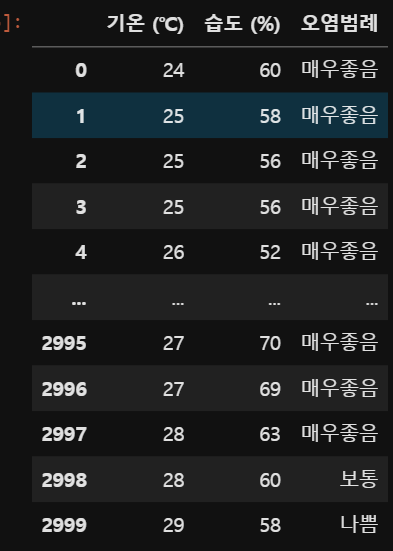
2. 모델 생성 및 학습
2-1. 데이터 전처리
먼저 오염범례 열은 정답 데이터이니 데이터 프레임에서 분리합니다.
train_df = all_df.drop(['오염범례'],axis=1)
train_df
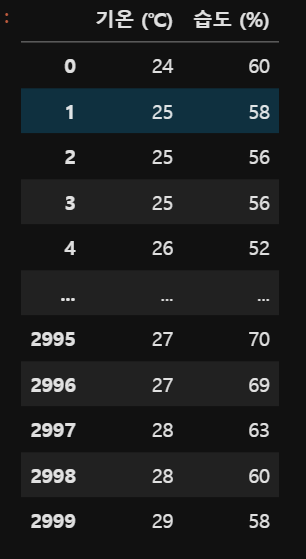
다음 훈련 데이터와 테스트 데이터로 나누어 줍니다.
from sklearn.model_selection import train_test_split
import numpy as np
x_train, x_test, y_train, y_test = train_test_split(train_df,np.array(all_df['오염범례']),test_size=0.3,random_state=42)
print(x_train.shape, x_test.shape)
print(y_train.shape, y_test.shape)
다음 훈련 데이터를 정규화하기 위해 StandardScaler를 통해 스케일링 해줍니다.
from sklearn.preprocessing import StandardScaler
std = StandardScaler()
std.fit(x_train)
x_train_std = std.transform(x_train)
x_test_std = std.transform(x_test)

print(x_train_std.min())
print(x_train_std.max())
print(x_train_std.mean())
print(x_train_std.std())
다음 타겟 데이터가 문자로 이루어져 있으므로 학습을 위해 수치화하는 과정이 필요합니다.
OneHotEncoding을 통해 0,1로 이루어진 데이터로 변경하겠습니다.
from sklearn.preprocessing import OneHotEncoder
ohe = OneHotEncoder()
ohe.fit(y_train.reshape(-1,1))
y_train_ohe = ohe.transform(y_train.reshape(-1,1)).toarray()
y_train_ohe
OneHotEncoding의 입력은 2차원 배열이어야 하므로 타겟 데이터를 reshape해줍니다.
2-2. MLP 모델 생성 및 학습
다음 tensorflow 모델을 불러오고 MLP 모델을 생성하겠습니다.
from tensorflow import keras

def model_fn():
    model = keras.Sequential()
    model.add(keras.layers.Dense(10, activation='relu',input_shape=(2,)))
    model.add(keras.layers.Dense(5, activation='softmax'))
    return model
Dense는 MLP모델에서 하나의 층을 의미하며
위 모델은 노드가 10개인 hiden layer와 노드가 5개인 output layer로 구성되어 있습니다.
output layer의 노드가 5개인 이유는 타겟 데이터의 클래스가 5개이기 때문입니다.
hiden layer의 활성화 함수는 relu로 사용합니다.
output layer에서 분류 알고리즘은 대부분 softmax를 사용하니 softmax를 사용합니다.
model = model_fn()
model.summary()
모델의 구성을 알 수 있습니다.
다음 모델을 컴파일 해줍니다.
model.compile(optimizer='adam',loss='categorical_crossentropy',metrics=['acc'])
optimizer는 adam, loss는 OneHotEncoding을 사용하므로 categorical_crossentropy를 사용합니다.
ep = 40
batch = 1800
learning = model.fit(x_train_mms, y_train_ohe,
                    epochs = ep,
                    batch_size=batch,
                    validation_split=0.2)
모델을 학습시킵니다.
epochs, batch, validation_split은 모두 임의의 값이므로 최적의 결과가 나오는 값을 사용하시면 됩니다.
이 포스트에선 batch 사이즈를 훈련데이터의 크기와 동일하게 설정해 BGD 모델을 사용합니다.
x_test_mms = mms.transform(x_test)
y_test_ohe = ohe.transform(y_test.reshape(-1,1)).toarray()

test_loss,test_acc = model.evaluate(x_test_mms,y_test_ohe)
print('Loss: ',test_loss)
print('Accuracy: ',test_acc*100)
훈련 데이터의 정확도입니다.
import matplotlib.pyplot as plt
plt.subplot(121)
plt.plot(learning.history['loss'],label='training')
plt.plot(learning.history['val_loss'],label='validation')
plt.legend()
plt.title('Loss')

plt.subplot(122)
plt.plot(learning.history['acc'],label='training')
plt.plot(learning.history['val_acc'],label='validation')
plt.legend()
plt.title('Acc')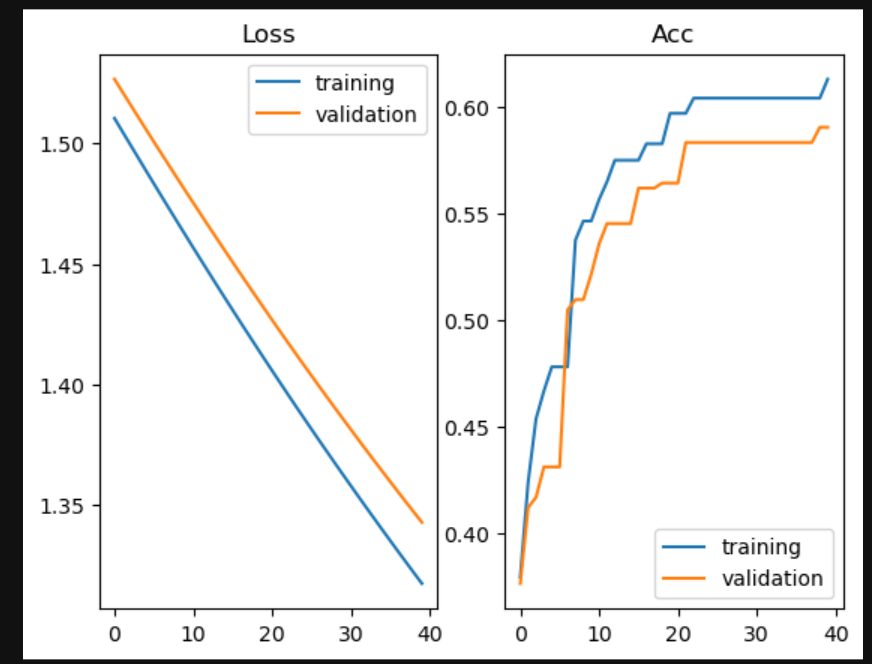
Loss값과 정확도를 확인한 결과 모델이 타겟 값을 잘 예측하는 것을 볼 수 있습니다.
'머신러닝' 카테고리의 다른 글
| [Codex] Codex 환경 구축 (2) | 2026.05.04 |
|---|---|
| [파이썬] Hadoop과 Spark를 이용한 빅데이터 처리 (0) | 2026.03.25 |
| [파이썬] 파이썬에서 Mongo DB 활용하기 (1) | 2026.03.09 |
| [파이썬] Mongo DB 설치와 파이썬 연동 (0) | 2026.03.03 |
| [파이썬] Ridge,Lasso Regression and Confusion matrix (21) | 2023.11.28 |


